How to transcribe noisy audio and cut background-noise errors (2026)
Background noise is the biggest cause of transcription errors. A practical guide to recording cleaner audio, the settings that matter, when (and when not) to denoise before transcribing, and how to handle audio that is beyond saving.
Background noise is the single biggest cause of transcription errors. Even the most advanced AI speech recognition models struggle when the audio signal is competing with traffic, HVAC hum, cross-talk, or room echo. A recording that transcribes almost perfectly in a quiet room can degrade sharply in a noisy one, turning a useful transcript into something that requires extensive manual correction.
The good news is that most noisy audio problems are either preventable or fixable. This guide covers the full chain: how to record cleaner audio in the first place, how to process noisy recordings before transcribing, how to configure your transcription settings for best results, and how to handle the cases where the audio is genuinely beyond saving.
Why background noise affects transcription accuracy
To understand why noise causes transcription errors, it helps to know how automatic speech recognition (ASR) works at a basic level.
ASR models convert audio into text by analyzing the acoustic properties of sound, breaking the signal into small time windows, and predicting which words or phonemes are most likely at each point. The model has been trained on thousands of hours of speech and has learned the statistical patterns that distinguish one word from another.
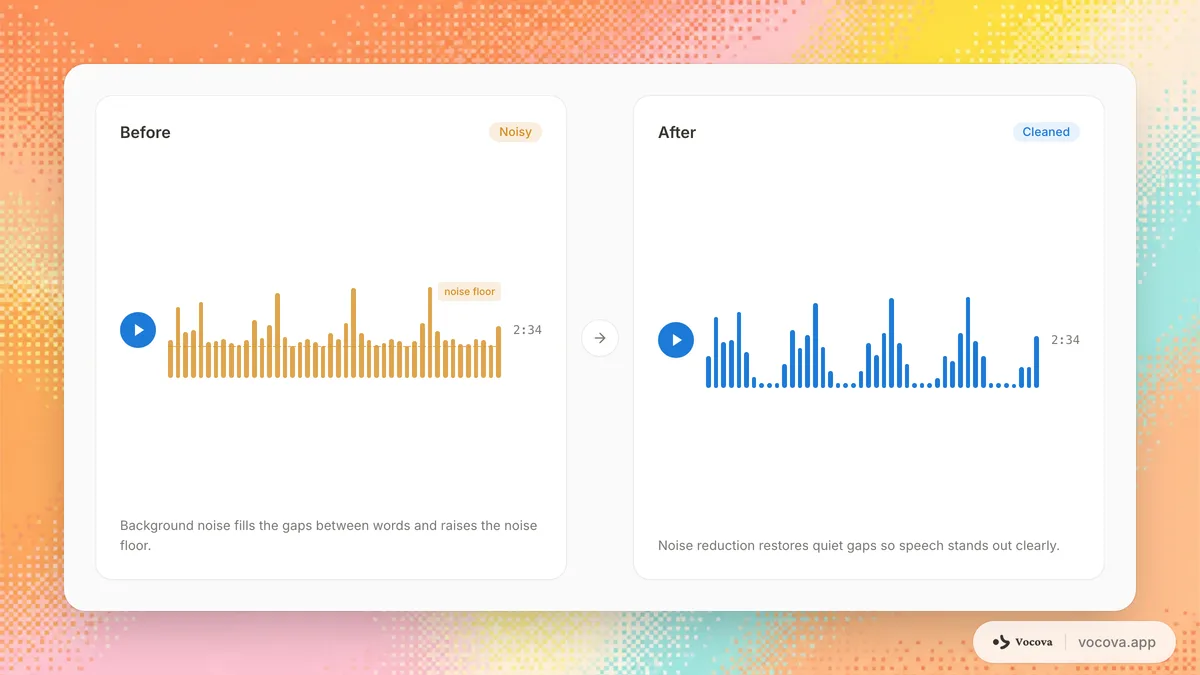
Background noise disrupts this process by adding acoustic energy that does not correspond to speech. When a fan drone or crowd murmur occupies the same frequency range as the speaker's voice, the model cannot cleanly separate the two signals. It makes its best guess, but those guesses become less reliable as the noise level increases.
The technical term for this is signal-to-noise ratio (SNR). SNR measures how much louder the speech signal is compared to the background noise, expressed in decibels. An SNR of 30 dB or higher (speech is much louder than noise) produces good transcription results. An SNR below 10 dB (speech is barely louder than noise) leads to significant accuracy loss. The loss is steep, not gradual: error rates climb sharply as SNR falls, which is why even a bit of extra microphone distance, or a single running HVAC unit, can collapse accuracy.
Transcription accuracy is typically measured using word error rate (WER). A quiet, well-recorded interview can sit under 5% WER; the same conversation in a busy cafe can climb past 20-25%. The exact numbers depend on the model, language, and noise type, see transcription accuracy by language for how much the clean-audio baseline alone varies, but the gap here is almost entirely attributable to noise.
Types of audio noise
Not all noise affects transcription equally. Understanding the type of noise in your recording helps you choose the right approach for dealing with it.
Ambient noise
Constant background sounds such as air conditioning, traffic, fans, or refrigerator hum. This type of noise is relatively consistent in volume and frequency, which makes it the easiest to remove with noise reduction tools. However, if it is loud enough, it still degrades transcription accuracy.
Electronic noise
Hiss, buzz, or hum introduced by the recording equipment itself. Common causes include low-quality microphones, ground loops in wired setups, electromagnetic interference from nearby electronics, and audio interfaces with high noise floors. Electronic noise is usually consistent and treatable with noise reduction.
Reverberation
Echo caused by sound bouncing off hard surfaces in a room. Reverb smears the speech signal over time, making it harder for ASR models to identify word boundaries. A speaker in a tiled bathroom or empty conference room will produce significantly more reverb than one in a carpeted, furnished office. Reverberation is harder to remove than ambient noise because it is a transformed version of the original signal.
Cross-talk and overlapping speech
Multiple people speaking at the same time. This is one of the hardest noise types for transcription because the interfering signal is itself speech, and the model has difficulty separating the two speakers. Cross-talk commonly occurs in meetings, panel discussions, and group interviews.
Wind noise
Low-frequency rumble caused by air movement across the microphone. Wind noise is common in outdoor recordings and can completely mask speech in strong gusts. It primarily affects the low end of the frequency spectrum and can often be reduced with a high-pass filter or windscreen.
Impulsive noise
Sudden, short-duration sounds such as keyboard clicks, paper shuffling, coughs, or construction impacts. These are brief but can corrupt individual words or phrases. ASR models may misinterpret a sharp click as a consonant sound, inserting phantom words into the transcript.
Pre-recording tips for cleaner audio
The most effective way to get accurate transcriptions from noisy environments is to capture better audio in the first place. A few minutes of preparation before hitting record can save hours of cleanup afterward.
Choose the right microphone
Microphone selection has a major impact on noise rejection.
- Lavalier (lapel) microphones clip close to the speaker's mouth, keeping the speech signal strong relative to room noise. They are ideal for interviews and presentations.
- Directional (cardioid or shotgun) microphones capture sound primarily from the front and reject sound from the sides and rear. Point them at the speaker and away from noise sources.
- Omnidirectional microphones capture sound equally from all directions. They are useful for group discussions but pick up more ambient noise.
- Headset microphones position the capsule close to the mouth and are excellent for noisy environments, which is why call centers and pilots use them.
Position the microphone correctly
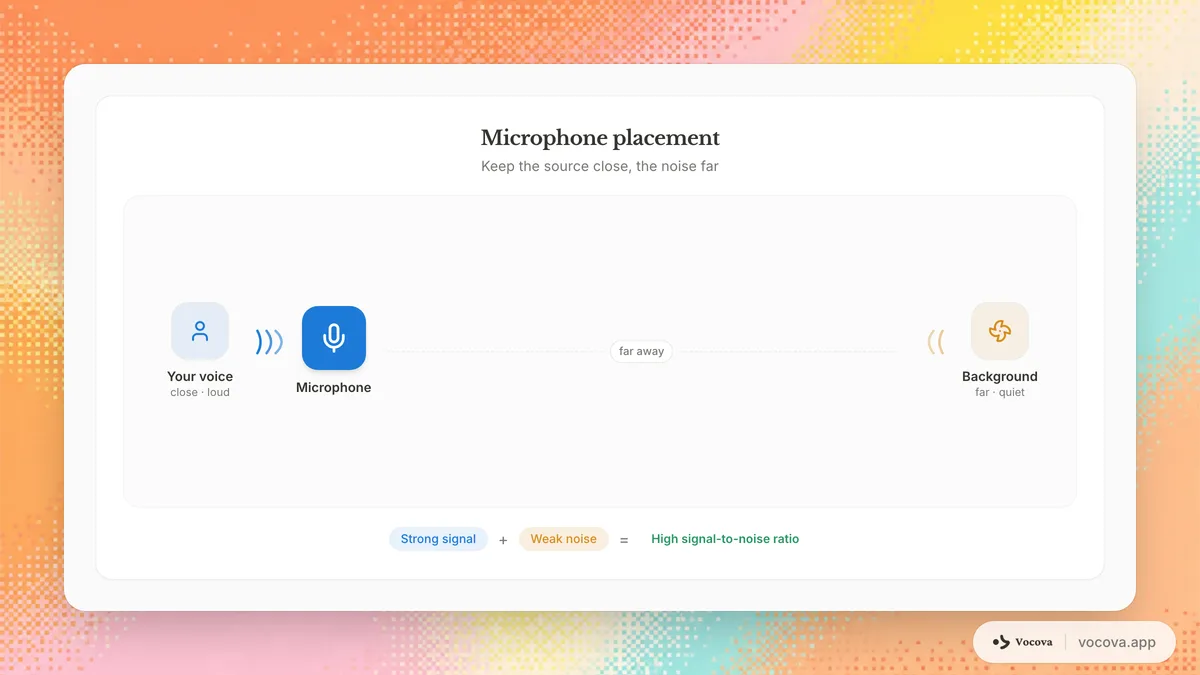
Distance matters more than most people realize. Doubling the distance between the microphone and the speaker reduces the speech signal by approximately 6 dB while the background noise level stays the same. Keep the microphone as close to the speaker as practically possible.
For a lapel mic, clip it 15-20 cm below the chin. For a desk microphone, position it 15-30 cm from the speaker's mouth. Avoid placing microphones near noise sources like computer fans, air vents, or windows facing a busy street.
Treat the room
You do not need a professional studio to significantly reduce noise and reverb.
- Close windows and doors to block external noise
- Turn off air conditioning, fans, and unnecessary electronics during recording
- Add soft materials (curtains, rugs, upholstered furniture) to reduce echo
- Avoid rooms with hard, parallel surfaces (tile floors, glass walls) that create reverb
- If recording in an office, choose a smaller, carpeted room over a large conference room
Use a windscreen outdoors
If you are recording outside, use a foam windscreen or a furry wind cover (often called a "dead cat") on your microphone. Wind noise is extremely disruptive to transcription and almost impossible to fully remove in post-processing.
Record a reference noise sample
Before the speaker begins talking, record 10 to 15 seconds of just the room noise. This "noise print" is useful for noise reduction tools, which use it to learn the characteristics of the noise and subtract it from the recording.
Recording settings that affect transcription accuracy
Beyond microphone choice and room treatment, a few technical recording settings determine how much vocal detail survives to the transcription stage.
Sample rate. Most modern ASR models resample everything to 16 kHz internally, the rate they were trained on, so a higher sample rate gives no accuracy benefit. Record at 44.1 kHz or 48 kHz for compatibility and clean archival, not for transcription accuracy; 16 kHz mono is already sufficient for the model. There is no speech-recognition benefit above 48 kHz.
Bit depth. Record at 16-bit or 24-bit. The difference matters most for quiet passages: 24-bit captures soft speech with less quantization noise, which helps when the speaker is further from the microphone.
Mono vs stereo. For a single speaker, mono is fine and produces smaller files. For multiple speakers, recording each voice to a separate channel measurably improves speaker diarization, because the model can separate voices that arrive on distinct, clean channels.
File format. WAV and FLAC are lossless and ideal for transcription. MP3 at 192 kbps or higher is acceptable; AAC/M4A (used by most phones) is slightly better than MP3 at the same bitrate; OGG/Opus offers good quality at lower bitrates. If storage allows, archive in WAV or FLAC. Most tools, including Vocova, accept all common formats, the priority is preserving detail in the recording itself, not the container.
Choosing microphone type and connection
The microphone guidance above focuses on directionality for noise rejection. Two further choices set the baseline quality of any recording.
- Condenser vs dynamic. Condenser microphones are more sensitive and capture more vocal detail, which helps in quiet, controlled rooms, but they also pick up more ambient noise. Dynamic microphones reject more background noise by design, making them the safer choice in untreated or noisy spaces.
- USB vs XLR. USB microphones (for example the Rode NT-USB Mini or Audio-Technica AT2020USB+) include a built-in audio interface and are the pragmatic choice for most people. XLR microphones need a separate interface but offer lower noise floors and more control, worth it mainly if you already own the interface.
For transcription, the environment matters more than the specific microphone. A $50-100 USB microphone placed correctly in a quiet room produces transcription-grade audio.
Tips for specific recording scenarios
- Meetings: Use a dedicated conference microphone (such as the Jabra Speak or Anker PowerConf) at the center of the table rather than a laptop microphone. For remote meetings, record the meeting software's audio output directly and ask participants to wear headsets to avoid echo.
- Interviews: Give the interviewer and interviewee separate microphones, ideally wireless lavaliers recorded to separate channels. For call interviews, record through software rather than pointing a microphone at a speakerphone.
- Lectures: A lavalier microphone on the presenter is the most reliable setup. Have the presenter repeat audience questions before answering, since audience audio is rarely captured cleanly.
- Podcasts: Give each host and guest their own microphone on a separate track. For remote recording, have each participant record locally (with tools like Riverside.fm or Zencastr) and combine tracks afterward to avoid video-call compression artifacts.
Common recording mistakes that hurt transcription
- Phone in a pocket or bag. Fabric muffles the high frequencies needed to distinguish consonants, and movement adds rustling noise. Place the phone on a stable surface facing the speaker.
- Sitting too far from the microphone. Distance weakens the speech signal while the background noise stays constant, so the recording ends up noise-dominated. Stay close.
- Gain set too high. Clipping is permanent distortion that cannot be repaired. Set levels so normal speech peaks around -12 dB to -6 dB.
- Gain set too low. Recording too quietly forces you to amplify later, which also amplifies the noise floor.
- Recording over Bluetooth. The hands-free Bluetooth profile heavily compresses call audio. Use a wired connection for recording whenever possible.
- No test recording. Record and play back 30 seconds before the real session. Catching room echo, hum, or handling noise beforehand is far cheaper than discovering it after a two-hour recording.
How to clean up noisy audio before transcribing
If you already have a noisy recording, audio processing tools can improve the signal quality before you send it to a transcription service. The results will not match a clean original recording, but they can help.
A caveat that surprises people: denoising does not always help AI transcription. Whisper-class models were trained on plenty of imperfect audio, and several 2025-2026 studies (for example, When De-noising Hurts, 2025, and When Denoising Hinders, 2026) found that speech-enhancement and denoising tools actually raised word error rate, sometimes sharply, even when the audio sounded cleaner to a human, because the processing introduces artifacts the model was never trained on. The reliable rule: process a short sample both ways, transcribe each, and keep whichever wins. Surprisingly often, that is the raw audio. The tools below help most on steady, well-characterized noise; they help least (and can hurt) on speech-like interference and reverb.
Audacity (free, open source)
Audacity is a free audio editor with a built-in noise reduction tool.
- Select a portion of the audio that contains only noise (no speech)
- Go to Effect > Noise Reduction > Get Noise Profile
- Select the entire audio track
- Apply Noise Reduction with settings around 12 dB reduction, 6 sensitivity, and 3 frequency smoothing
- Preview the result and adjust if speech sounds distorted
Audacity also has a high-pass filter (Effect > Filter Curve) that can remove low-frequency rumble from wind or HVAC systems. Cut frequencies below 80-100 Hz for spoken voice recordings.
Adobe Podcast Enhance Speech (free, web-based)
Adobe offers a free online tool that uses AI to enhance speech recordings. Upload your audio file and the tool attempts to isolate the voice, reduce noise, and normalize the volume. It works well for moderate noise levels and is simple enough for non-technical users. The limitation is a file size cap and the fact that it processes the entire file without granular control.
iZotope RX
iZotope RX is a professional audio repair suite used in broadcast and film post-production. It offers advanced tools for noise reduction, de-reverb, de-click, de-hum, and dialogue isolation. It is the most capable option but comes with a significant learning curve and cost. For regular transcription work with challenging audio, it is worth the investment.
General tips for audio cleanup
- Apply noise reduction conservatively. Aggressive settings remove noise but introduce artifacts that sound like metallic warbling. These artifacts can confuse ASR models as much as the original noise.
- Use a high-pass filter to remove rumble below 80 Hz. Human speech does not contain meaningful information below this frequency.
- Normalize the audio level so the speech peaks at around -3 dB to -6 dB. ASR models perform better with consistent volume levels.
- Do not compress dynamic range excessively. Some compression helps with whispered or shouted speech, but heavy compression raises the noise floor.
AI transcription settings for noisy audio
Once you have cleaned up your audio as much as possible, the right transcription settings can further improve accuracy.
Specify the language
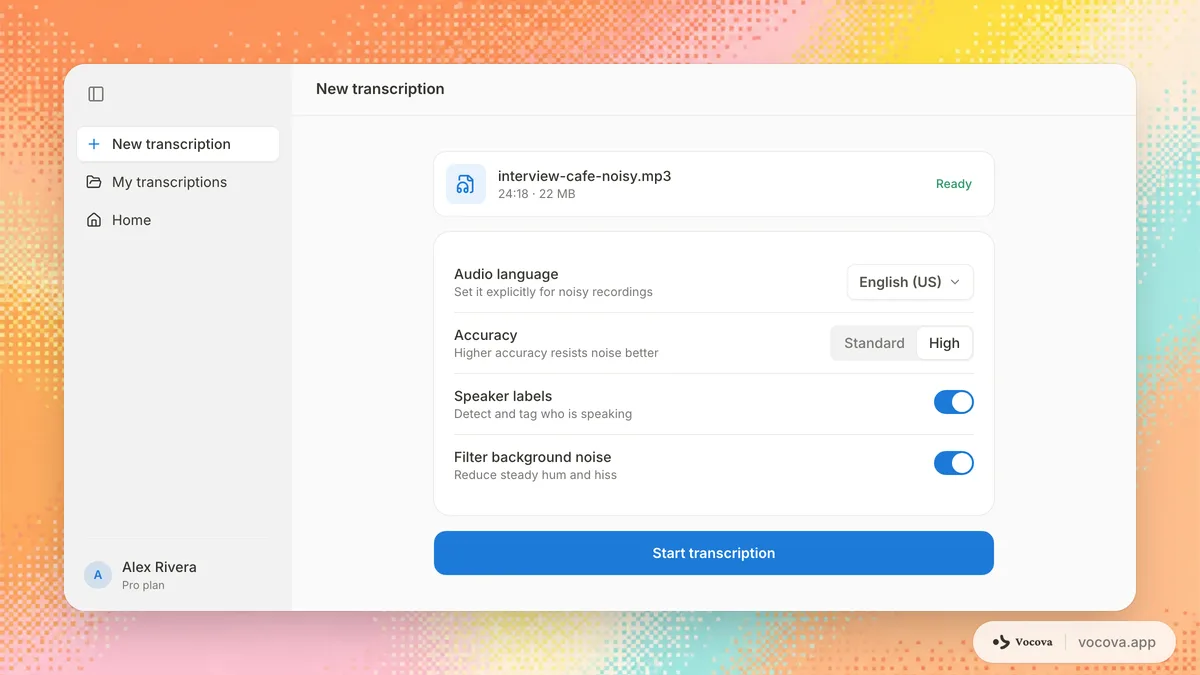
Most ASR systems perform better when you specify the spoken language rather than relying on auto-detection. Auto-detection adds an extra inference step that can go wrong with noisy audio, potentially selecting the wrong language model entirely. If you know the language, set it explicitly.
Choose the right model tier
Many transcription services offer multiple model tiers, and higher-accuracy tiers generally handle noise better because they use larger models with more capacity to separate speech from interference. If your provider has one, it is worth trying on a difficult sample, you can test it on your own clip with audio to text.
Use speaker diarization carefully
Speaker diarization, the process of identifying who said what, relies on detecting acoustic differences between speakers. Background noise can mask these differences, causing the diarization model to split one speaker into multiple labels or merge different speakers into one. If your audio is noisy and diarization results look unreliable, you may get better results by transcribing without diarization and adding speaker labels manually.
Break long recordings into segments
If only portions of a long recording are noisy, consider splitting the file into segments and transcribing them separately. This prevents a noisy section from affecting the model's performance on the cleaner portions. You can also apply different noise reduction settings to different segments based on their noise characteristics.
Post-transcription cleanup tips
Even with optimal audio preparation and transcription settings, noisy recordings will produce transcripts that need manual review. Here are strategies for efficient cleanup.
Focus on high-error sections first
Listen to the audio alongside the transcript and identify the sections where the transcription diverges most from the actual speech. These are usually the moments with the highest noise levels. Prioritize correcting these sections rather than reading the entire transcript linearly.
Use timestamps to navigate
Transcription tools that provide word-level or segment-level timestamps let you click directly to the relevant audio position. This makes it much faster to verify and correct individual words compared to scrubbing through the audio manually. Vocova provides timestamps for each segment, so you can jump directly to any point in the recording.
Watch for common noise-induced errors
Noisy audio produces characteristic transcription errors:
- Phantom words inserted where the model interpreted noise as speech
- Dropped words where noise masked the speech signal entirely
- Homophones and near-misses where the model chose a similar-sounding word because the noise obscured the distinguishing sounds
- Garbled proper nouns since names and technical terms are less predictable from context
Use find-and-replace for systematic errors
If the model consistently mistranscribes a specific term throughout the recording (a person's name, a company name, a technical word), use find-and-replace to correct all instances at once rather than fixing them individually.
Consider a second pass with translation
If the original transcription has significant errors and you also need a translated version, fixing the source transcript first is critical. Translation models propagate and sometimes amplify errors from the source text. Clean the transcript before translating.
When noisy audio is beyond saving
There are situations where no amount of noise reduction or AI tuning will produce a usable transcript. Recognizing these cases early saves time and frustration.
Signs the audio may be unsalvageable:
- You cannot understand the speech yourself when listening carefully with headphones
- Multiple speakers are talking simultaneously for extended periods with no clear dominant voice
- The SNR is below 5 dB, meaning the noise is nearly as loud as or louder than the speech
- Severe clipping (distortion from the recording level being too high) has permanently corrupted the waveform
- Heavy reverberation makes the speech sound like it was recorded in a tunnel or stairwell
Options when AI transcription fails
- Human transcription by a professional who can use contextual clues, lip-reading (if video is available), and subject matter expertise to decode difficult audio. This is slower and more expensive but handles edge cases that AI cannot. For a deeper comparison, see our guide on AI vs human transcription.
- Re-record if possible. If the content allows it, scheduling a new recording session with better equipment and environment is often faster than trying to salvage a severely degraded recording.
- Partial transcription. Transcribe the sections with acceptable audio quality and note the gaps. A transcript with clearly marked [inaudible] sections is more useful than one filled with incorrect guesses.
Frequently asked questions
What is the biggest factor affecting transcription accuracy?
Signal-to-noise ratio. The louder the speech is relative to the background noise, the more accurately any transcription tool, whether AI or human, can identify the words. A close-positioned microphone in a quiet room produces the best results. See the sections above on recording settings, microphone choice, and reducing background noise for the fastest ways to raise it.
Can AI transcription tools handle background music?
Moderately. If the music is quiet and the speech is clear, most modern ASR models can transcribe through it. Loud music, especially with vocals, causes significant accuracy problems because the model cannot reliably distinguish the target speech from the singing. Instrumental background music at low volume is less disruptive than vocal music at any volume.
Should I use noise reduction before uploading audio for transcription?
Not automatically, test it first. It is intuitive that cleaner audio transcribes better, but modern AI models like Whisper were trained on noisy data, and 2025-2026 studies found that denoising and speech-enhancement tools frequently raised word error rate even when the audio sounded better to a human, because the processing adds artifacts the model was not trained on. The reliable approach is to transcribe a short sample both raw and denoised and keep whichever is more accurate. If you do denoise, keep it gentle: aggressive settings introduce metallic artifacts that hurt more than they help.
Does specifying the language improve accuracy for noisy audio?
Yes. When you manually set the language, the ASR model uses the correct vocabulary and language model from the start. With noisy audio, the auto-detection step is more likely to misidentify the language, which then applies the wrong model for the entire transcription. Always specify the language when you know it.
How much does audio quality affect word error rate?
Substantially, though the exact numbers vary by model, language, and noise type, so treat these as rough illustrations rather than measured guarantees. Clean studio audio often sits under 5% WER with modern ASR; moderate office or light-traffic noise tends to land in the low double digits; a crowded restaurant or construction site can push it past 30%. The relationship is not linear, accuracy degrades rapidly once SNR drops below roughly 15 dB. For how much the clean-audio baseline itself varies between languages, see transcription accuracy by language.
Is it better to transcribe noisy audio with AI or a human transcriptionist?
For moderately noisy audio, AI tools are usually sufficient and much faster. For severely degraded audio where even careful listening is difficult, a skilled human transcriptionist will typically outperform AI because they can use contextual reasoning, subject matter knowledge, and visual cues from video to fill in gaps. The comparison between AI and human transcription depends heavily on the specific noise conditions and your accuracy requirements.
What is the best audio format for transcription?
WAV and FLAC are best because they are lossless and preserve full audio detail. In practice, MP3 at 192 kbps or higher also works well. Most AI transcription tools accept all common formats, so the priority is recording at a high bitrate rather than worrying about the specific container format.
Is it worth buying an expensive microphone for transcription?
Usually not. A $50-100 USB microphone in a quiet room with correct placement produces transcription-grade audio. Expensive microphones add vocal richness that matters more for music and broadcast than for speech-to-text accuracy. Invest in room treatment and microphone placement before upgrading the microphone itself.
Sources and further reading
- Chondhekar et al., "When De-noising Hurts: A Systematic Study of Speech Enhancement Effects on Modern Medical ASR Systems" (arXiv, 2025), speech enhancement raised word error rate on Whisper-class models even when audio sounded cleaner
- Islam, Nahar & Hamid, "When Denoising Hinders: Revisiting Zero-Shot ASR with SAM-Audio and Whisper" (arXiv, 2026)
- Mu et al., "Performance evaluation of automatic speech recognition systems on integrated noise-network distorted speech", Frontiers in Signal Processing (2022), WER vs SNR
- Hugging Face Audio Course: preprocessing: modern ASR models expect 16 kHz audio
- Engineering ToolBox: inverse-square law: the ~6 dB-per-doubling-of-distance rule
- National Center for Voice and Speech: fundamental frequency: context for the 80-100 Hz high-pass cutoff
