How to translate audio and video into another language (with bilingual subtitles)
The translation half of the workflow: choosing between translated text, bilingual transcripts, subtitles, and voiceover; handling subtitle text expansion, reading speed, right-to-left and CJK scripts; keeping names and terms consistent; and localizing one video into many languages at once.
Last verified 2026-06-24. Vocova-specific limits (supported language counts, Plus / Pro features) match the current product configuration on that date. If a number here drifts from what the app shows, the app is the source of truth.
Translating a recording is two jobs, not one. The first is getting an accurate transcript in the original language, the recognition half, with its own decisions about language detection and code-switching, covered in how to transcribe audio in multiple languages. This guide is about the second half: turning that source transcript into the right translated deliverable, and making the result actually work on screen and on the page.
One rule governs everything below: translate from a reviewed source transcript, never straight from raw audio. Translation faithfully preserves whatever the transcript says, including its mistakes, so a misheard name or number doesn't just stay wrong; it gets translated wrong, in two languages instead of one. Assume from here on that you have a clean, timestamped source. The interesting decisions are about output:
- Which deliverable you actually need, translated text, a bilingual transcript, translated subtitles, bilingual subtitles, or a voiceover.
- Whether the translation physically fits on screen in the time the original took to say it.
- Keeping names and terms consistent across the whole file.
- Doing it once for many languages instead of repeating the work.
Vocova handles transcription and translation into 140+ target languages in one place, so timestamps and speaker labels survive from audio all the way to a translated .srt. Start with translate audio for audio, translate video for subtitles, or bilingual subtitles when both languages share the screen.
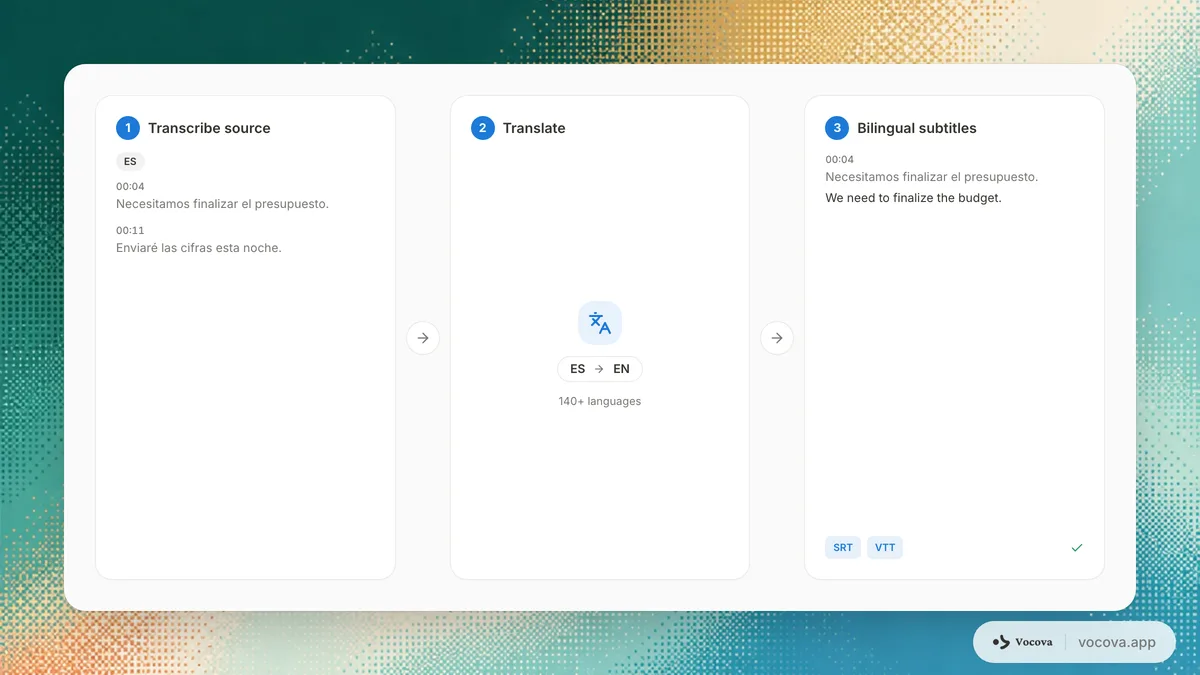
The reviewed source caps everything, then forget about it
You cannot translate your way out of a bad transcript. If the source has a 20% word error rate, no translation step recovers the meaning recognition lost; it just produces fluent, confident, wrong target text. So fix the source first, names, numbers, and domain terms especially, and lean on the recognition guide above plus transcription accuracy by language to know what each language realistically delivers before you translate.
That is the last time this guide will dwell on the source. Everything from here assumes it is clean and is about the translation itself.
Pick the deliverable, not just the language
"Translate this video" hides five different outputs. Choosing the wrong one means redoing the export, or worse, shipping the wrong format to an audience.
| Deliverable | What it is | Best for | Watch out for |
|---|---|---|---|
| Translated text | A clean document in the target language only | Reports, articles, sharing with a single-language audience | Loses timing; not for video |
| Bilingual transcript | Source and translation paired, line by line | Review, QA, research citation, language learning | Twice the text to proofread |
| Translated subtitles | .srt / .vtt in the target language only | Publishing video to one language community | Text expansion can overrun the timing (see below) |
| Bilingual subtitles | Both languages stacked in one cue, one timestamp | Tutorials, language learning, mixed or global audiences | Two lines of text per cue, keep each short |
| Voiceover / dubbing | A spoken target-language track over the original | Explainers and ads where viewers won't read subtitles | Hardest to fit to timing; usually wants a human pass |
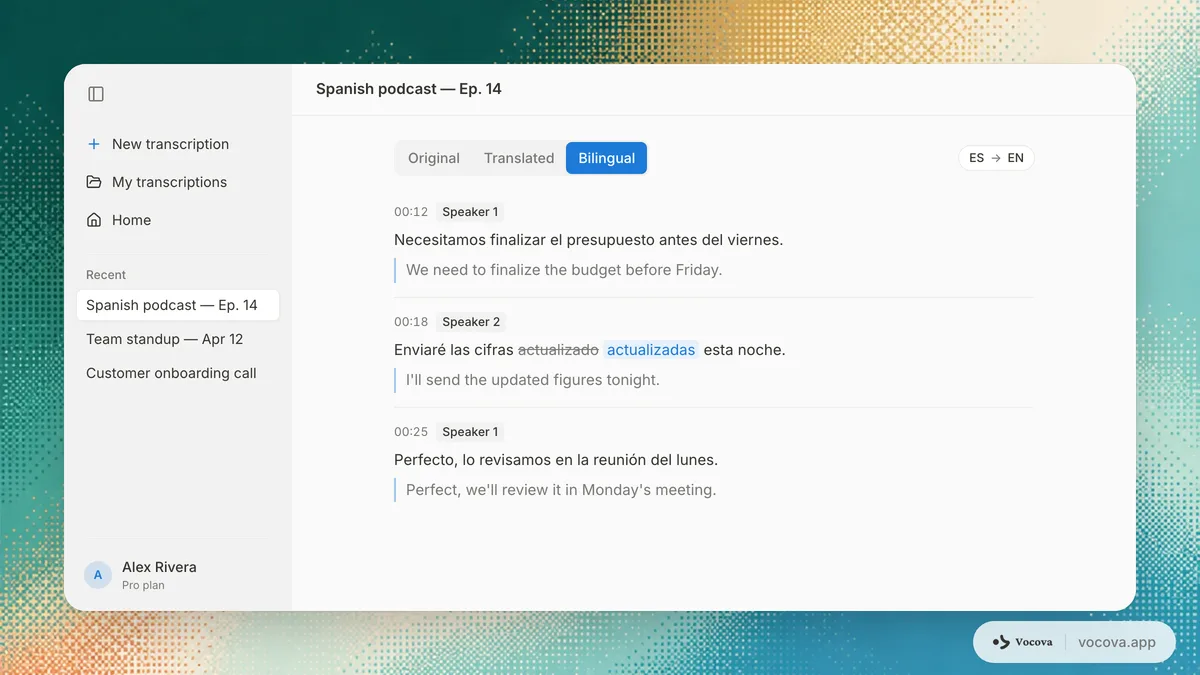
For most teams the honest default is translated subtitles for a single market and bilingual subtitles when reviewers, learners, or a multilingual team need to see both. Bilingual subtitles and translate video produce the subtitle files directly; a bilingual transcript export covers documents and research.
Why not just use the platform's auto-translation?
YouTube and most video platforms offer one-click auto-translated captions. For privately understanding a clip, they are fine. For anything you publish, they have three structural problems:
- They translate flawed captions, not a reviewed source. Auto-generated captions already contain recognition errors; auto-translation then translates those errors, with no review step in between.
- No control over terms or timing. You can't fix a mistranslated product name, enforce one consistent term, or condense a line that overruns; you get whatever the platform produces.
- You don't own the file. The captions stay on that platform; you can't reuse one reviewed
.srtacross YouTube, your own site, an LMS, and a client deliverable.
A dedicated workflow inverts all three: review the source first, control terms and timing, and export a portable subtitle file you own. Use auto-translate for a quick private gist; use a reviewed translation for anything with your name on it.
Direction, pivots, and scripts that change the layout
Two things about the target language matter more than the raw "140+ languages" count.
English is the strongest pivot. Translating into or out of English is usually the most accurate direction, because models are trained heaviest on English pairs. A Spanish → Japanese job is often cleaner if you treat English as the reference you review against. Quality is also tiered by how much data exists for each language, transcription accuracy by language has the tier list.
Some target scripts change the layout, not just the words, and this is where translated video quietly breaks:
- Right-to-left (Arabic, Hebrew, Persian, Urdu): the text direction flips. Numerals, Latin brand names, and punctuation embedded in an RTL line need correct bidirectional handling, and subtitles should be right-aligned. A player that renders RTL poorly turns a correct translation into a mess.
- CJK (Chinese, Japanese, Korean): these don't use the 42-Latin-character line rule. They have their own per-line character limits and line-breaking rules (you can't break mid-word the way Latin scripts do), and they usually contract relative to English rather than expand.
- Thai and other scripts without spaces: line breaking depends on word segmentation, not spaces, naive wrapping produces broken lines.
If your target is one of these, budget time to check rendering in the actual player, not just the text.
Subtitle translation is a different craft: expansion, reading speed, rewriting
This is the part that separates a translation that reads from one that flashes by unreadable. A translated subtitle has to be legible in the same time the original took to speak, and most languages don't translate at the same length.
Text expansion is the core problem
Translated text rarely matches the source length. Typical change versus English (localization rules of thumb; treat as ranges, not guarantees):
| Target language family | Typical length vs English | Subtitle implication |
|---|---|---|
| German | +10% to +35% | Frequently overruns; expect to condense |
| Romance (Spanish, French, Italian, Portuguese) | +15% to +30% | Often overruns on fast speech |
| Arabic | +20% to +25% | Expands and flips direction |
| Chinese, Japanese, Korean | −10% to −30% (contracts) | Fits easily, but obeys character-per-line limits |
When a translated line is too long for its time slot, you condense the wording; you never extend the cue past the next one, because that desyncs the rest of the file. Condensing (dropping filler, tightening phrasing while keeping meaning) is a real subtitling skill; it is also why a human pass matters more for subtitles than for plain documents.
Reading-speed and line limits
These are the widely used broadcast/streaming norms (see the BBC and Netflix guidelines linked at the end):
- Reading speed: keep cues under roughly 17 characters per second for adult audiences; lower for children's content and fast cuts.
- Line length: about 42 characters per line for Latin scripts, maximum two lines per cue. CJK uses its own character counts (commonly ~13-16 full-width characters per line).
- Minimum/maximum duration: very short flashes (well under a second) and very long holds both hurt readability.
A bilingual subtitle stacks the source above the translation in a single cue sharing one timestamp. Because both lines share the cue, keep each one tight, two long lines in two languages is the fastest way to blow past the reading-speed limit.
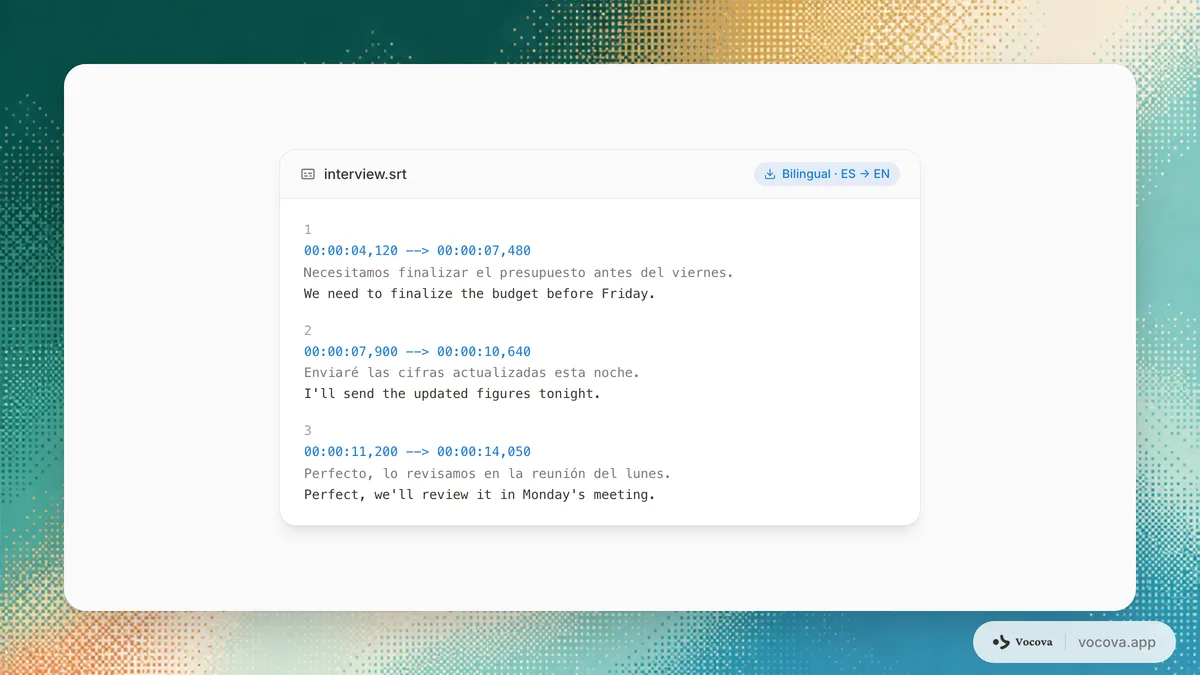
For the container itself, when to choose .srt vs .vtt, see SRT vs VTT and the subtitle file formats guide. Generate the file with SRT generator or VTT generator once the translation is reviewed.
Keep names and terms consistent across the whole translation
The subtlest translation failure is not a wrong sentence, it's the same term translated three different ways across one file. AI translation works segment by segment, so a product name, a job title, or a piece of jargon can drift between cues, especially across a long recording or when several speakers say it differently.
Before you publish, lock down a small glossary:
- Proper nouns: people, companies, products, places, should usually stay in the source form or use one agreed rendering, every time.
- Domain terms and acronyms: pick one target-language equivalent and use it consistently; don't let the model alternate.
- Tone and register: formal vs informal "you" (tú/usted, du/Sie, 你/您) should be one choice for the whole piece, matching the audience.
A side-by-side bilingual view makes this fast: scan the translation column for the term, fix every occurrence, and the timestamps never move. This consistency pass is cheap and is the difference between "machine-translated" and "localized."
Localize one video into many languages without redoing the work
The biggest efficiency win in translation is that the expensive work happens once. You review the source transcript a single time; every target language branches off that one clean original. This is the opposite of translating a video five times from scratch.
A realistic multi-language job, a 90-second product video going to five markets:
- Transcribe and review the source once (about 10 minutes). Fix names, the product term, and numbers in the original. This is the only language-agnostic manual step.
- Translate to all five targets from that source (a few minutes total). Each inherits the same timestamps, so all five subtitle files stay in sync with the video.
- Do a per-language fit pass, longest languages first. German and the Romance languages will have a cue or two that overrun, condense those. CJK targets usually need only a line-break check.
- Export one
.srtper language (plus a bilingual file if a market wants both).
Total: most of the time is the single source review plus a short per-language condensation pass, not five full translations. Keep the reviewed source as the canonical version; if the script changes, you re-translate from the updated source rather than editing five files by hand.
When to keep a human in the loop
AI translation is publishable as-is for a lot of routine work, and needs a human pass for the rest. A simple way to decide:
| Situation | AI-only is usually fine | Get a human pass |
|---|---|---|
| Internal notes, meeting recaps, gist, draft subtitles | ✓ | |
| High-resource pair (English ↔ Spanish/French/German/Portuguese) | ✓ (light review) | |
| Marketing, brand, or public-facing video | ✓ | |
| Legal, medical, regulatory, or published research | ✓ | |
| Low-resource target language | ✓ | |
| Voiceover/dubbing (timing + delivery) | ✓ |
The pattern: the lower the stakes and the higher-resource the pair, the safer AI-only is. When in doubt, ship a bilingual version so a fluent reviewer can compare against the source quickly.
Pre-publish checklist for a translated video
- Source transcript reviewed before translating (names, numbers, terms).
- Right deliverable chosen (translated vs bilingual subtitles vs voiceover).
- No cue over ~17 CPS or ~42 characters/line after expansion; long languages condensed, not extended.
- RTL/CJK rendering checked in the actual player, not just the text.
- One consistent rendering for every proper noun, term, and the formal/informal register.
- Timestamps and speaker labels still aligned in the exported file.
- For multi-language jobs: one canonical reviewed source, one file per language.
Frequently asked questions
What's the difference between translated subtitles and bilingual subtitles?
Translated subtitles show only the target language. Bilingual subtitles stack both languages in the same cue, sharing one timestamp, useful for language learners, tutorials, and mixed audiences. Both come from the same reviewed, timestamp-aligned transcript, so producing one or the other is just an export choice.
Why do translated subtitles overflow or flash by too fast?
Because most languages expand when translated, German and the Romance languages routinely run 20-35% longer than English. The fix is to condense the wording so it fits the original time slot, never to extend the cue (which desyncs everything after it). Keep cues under about 17 characters per second.
Can I put two languages in one subtitle file?
Yes, that's a bilingual subtitle: each cue holds the original line above the translation under one timestamp. Keep both lines short, since they share the cue's reading-speed budget.
Do subtitles translate themselves, or do I translate the transcript?
You translate the reviewed transcript, and the subtitle file is exported from it with timestamps intact. Translating an already-burned-in or already-exported subtitle separately is what breaks timing and term consistency, keep translation attached to the timestamped transcript.
How do I translate one video into several languages efficiently?
Review the source transcript once, then translate that single clean source into each target language. Every target inherits the same timestamps, so you only do a short per-language fit pass (condensing the languages that expanded) rather than translating the whole video repeatedly.
Which subtitle format should I use for a translated video?
.srt for maximum compatibility, .vtt when you need web styling or positioning. The choice is the same as for any subtitle; what changes with translation is line length and reading speed. See SRT vs VTT for the full comparison.
Is AI translation good enough to publish?
For internal use and high-resource language pairs, usually yes after a light review. For marketing, legal, medical, published research, low-resource languages, or voiceover, keep a human in the loop. Source quality also caps it, a noisy transcript can't translate well no matter the pair.
Sources and further reading
External:
- BBC Subtitle Guidelines: reading speed and line-length standards.
- Netflix Timed Text Style Guides: per-language subtitle requirements, including CJK character limits.
- W3C Internationalization: text size in translation: why translated text expands and contracts.
Related Vocova guides:
- How to transcribe audio in multiple languages: the recognition half: language detection, code-switching, and reviewing the source before you reach this guide.
- Transcription accuracy by language: the quality tier you start from before translating.
- SRT vs VTT: which subtitle container to export.
- The subtitle file formats guide: every format and when to use it.
Tools: