How to transcribe audio in multiple languages: a 2026 workflow guide
A practical workflow for multilingual audio transcription: language detection, code-switching, translation into 140+ target languages, bilingual transcripts, subtitles, and quality checks.
Last verified 2026-06-23. Vocova-specific limits (free-plan minutes/file size, Plus / Pro features, supported language counts) match the current product configuration on that date, if a number in this guide drifts from what the app shows, the app is the source of truth.
The safest multilingual workflow is: transcribe the original audio first, review the source transcript, then translate it. Do not jump straight from audio to translated text unless you are comfortable losing timestamps, speaker labels, and the ability to audit mistakes.
For most teams, the practical process looks like this:
- Upload the audio or paste a public media URL.
- Let the tool detect the spoken language, or choose it manually.
- Generate a timestamped transcript in the source language.
- Review names, numbers, and technical terms.
- Translate the transcript into the target language.
- Export text, bilingual documents, or translated subtitles.
Vocova supports transcription in 100+ spoken languages and translation into 140+ target languages on Plus / Pro. Start with audio to text for files, video to text for video, translate audio for translation workflows, or translate video when subtitles are part of the job.
The multilingual transcription workflow
| Step | Decision | Best practice |
|---|---|---|
| Import | File upload or public URL | Upload private files; paste links for public YouTube, Bilibili, SoundCloud, Dailymotion, podcast, or cloud-drive recordings |
| Language setup | Auto-detect or manual language | Use auto-detect for unknown audio; choose manually when you know the language or the intro is noisy |
| Transcription | Source-language transcript | Keep timestamps and speaker labels so the transcript stays auditable |
| Review | Names, terms, numbers, speakers | Fix high-impact errors before translating |
| Translation | One target language or many | Translate after source cleanup, not before |
| Export | TXT, PDF, DOCX, SRT, VTT, CSV, bilingual output | Match the output to the final use case |
When automatic language detection is enough
Automatic language detection works well when the first clear speech in the recording represents the main language. It is the right default for:
- Interviews where you do not know the spoken language in advance.
- User-submitted audio files.
- Podcast episodes from multiple countries.
- Research recordings collected across regions.
- Video libraries with inconsistent filenames.
It is less reliable when the first minute contains music, silence, title cards, sound effects, or a speaker briefly greeting the audience in another language. In those cases, choose the language manually before starting.
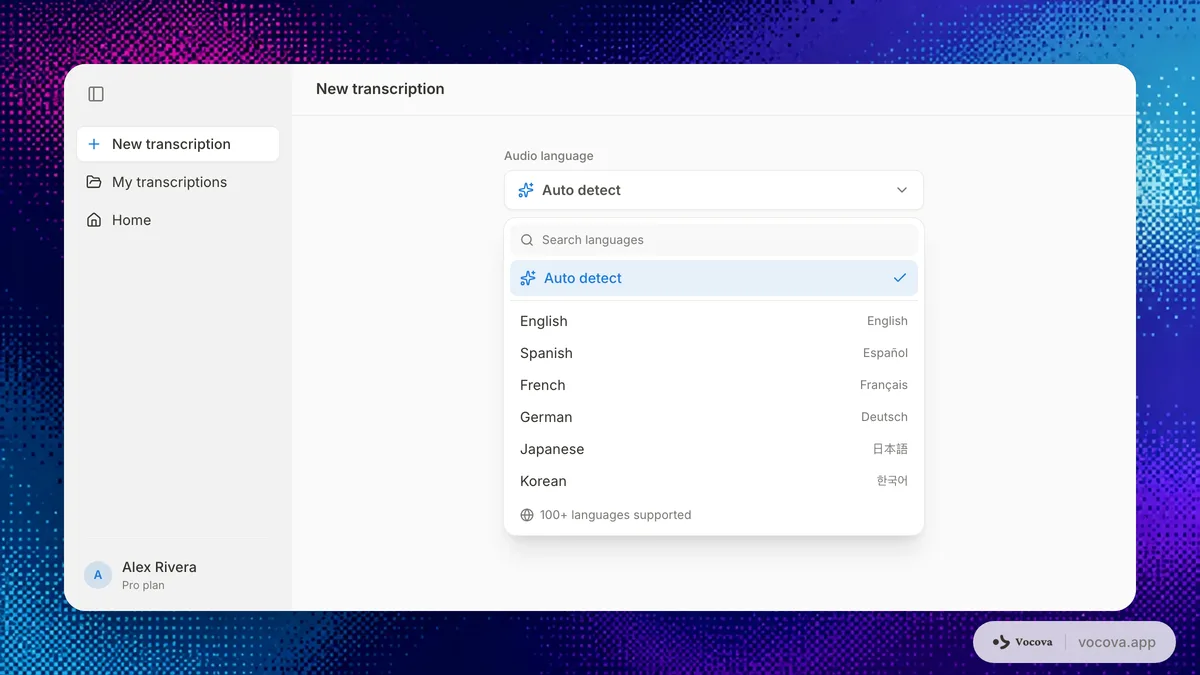
When to choose the language manually
Manual language selection improves accuracy when you already know the language or dialect family. It is especially useful for:
- Japanese, Korean, Mandarin, Cantonese, Thai, or Arabic content with long intros.
- Audio where the first speaker uses a different language from the rest of the recording.
- Educational videos that open with an English title slide but continue in another language.
- Multilingual meetings where one language dominates the discussion.
- Recordings with heavy accents or domain-specific terms.
Manual selection is not about restricting the model. It gives the transcription system a stronger starting point, which reduces early misclassification errors.
How to handle recordings with multiple languages
There are three common multilingual patterns.
One language per recording
This is the easiest case. A French interview, a Japanese lecture, or a Spanish podcast episode can be transcribed in the source language, reviewed, then translated into English or another target language.
Recommended workflow:
- Choose the source language if you know it.
- Transcribe.
- Review proper nouns and terms.
- Translate.
- Export a bilingual document if review matters.
Code-switching inside the same recording
Code-switching means speakers move between languages inside the same conversation, sometimes inside the same sentence. Examples include Hindi-English, Spanish-English, Mandarin-English, Korean-English, and Arabic-French conversations.
Recommended workflow:
- Choose the dominant language.
- Transcribe the full recording.
- Review mixed-language segments manually.
- Translate only after the source transcript is readable.
- Keep the original transcript alongside the translation.
Do not expect fully automatic translation to resolve every mixed-language phrase. The transcript is the audit layer.
Multiple speakers using different languages
This happens in international meetings, customer interviews, academic fieldwork, and multilingual webinars. One speaker may use Portuguese, another English, another Japanese.
Recommended workflow:
- Enable speaker identification if available.
- Transcribe in the dominant language or use auto-detect.
- Correct speaker names and language-specific terms.
- Translate to the review language.
- Export bilingual output so reviewers can compare source and translation.
Speaker labels matter here. They make it clear who said what, which is essential when the translation becomes a meeting record, research note, or customer evidence.
Why you should not translate before reviewing the transcript
Translation quality depends on source quality. If the source transcript says the wrong product name, person name, legal term, medication, company, game title, or place, the translation usually preserves the error. This page covers the transcription half; for the translation half, choosing between translated text, bilingual subtitles, and voiceover, see our guide to translating audio and video.
Review these before translating:
- Names of people, companies, products, artists, shows, games, and places.
- Numbers, dates, times, prices, and measurements.
- Acronyms and technical terms.
- Speaker labels.
- Repeated phrases caused by audio glitches.
- Segments with overlapping speakers.
You do not need to perfect every sentence before translation. Fix the terms that would be expensive or embarrassing if translated incorrectly.
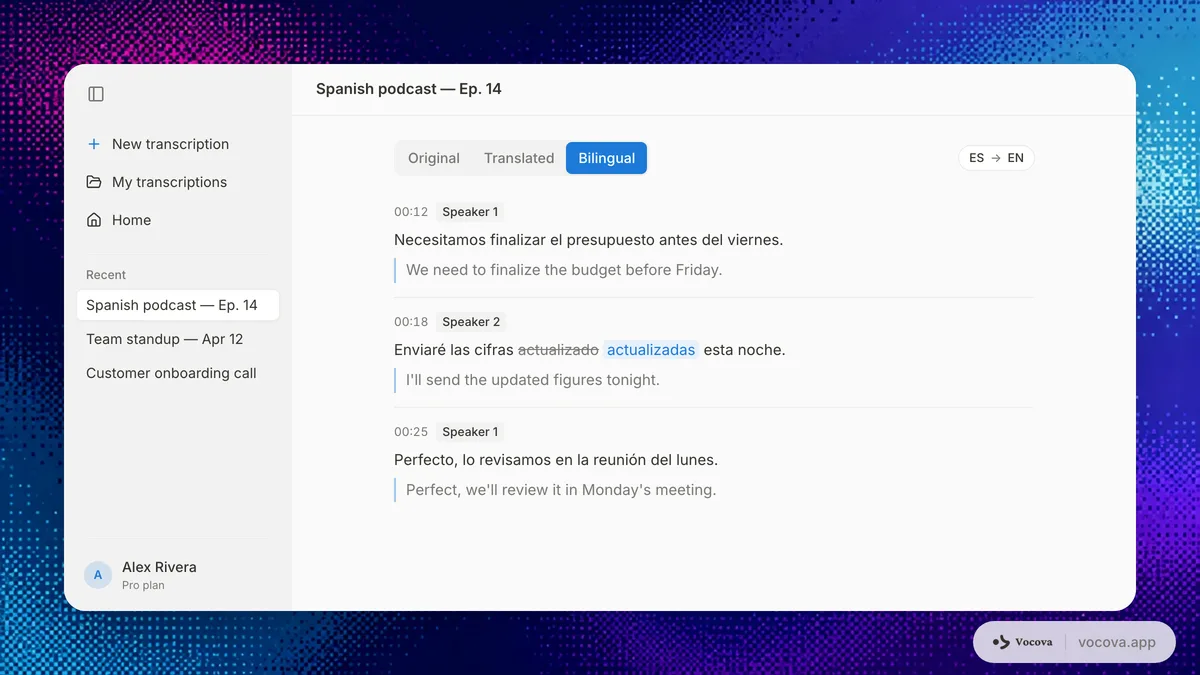
Export choices for multilingual work
| Output | Use it for | Notes |
|---|---|---|
| TXT | Quick copy, notes, search | Best for simple text reuse |
| Sharing a finished transcript | Good for clients, teams, and archives | |
| DOCX | Editing and comments | Best when humans will revise the text |
| SRT | Video subtitles | Broad compatibility with video platforms |
| VTT | Web video captions | Better for HTML5 and web players |
| CSV | Research, analysis, QA | Useful for segment-level review |
| Bilingual export | Translation review | Keeps source and target side by side |
For subtitle workflows, see SRT generator, VTT generator, SRT vs VTT, and the subtitle file formats guide.
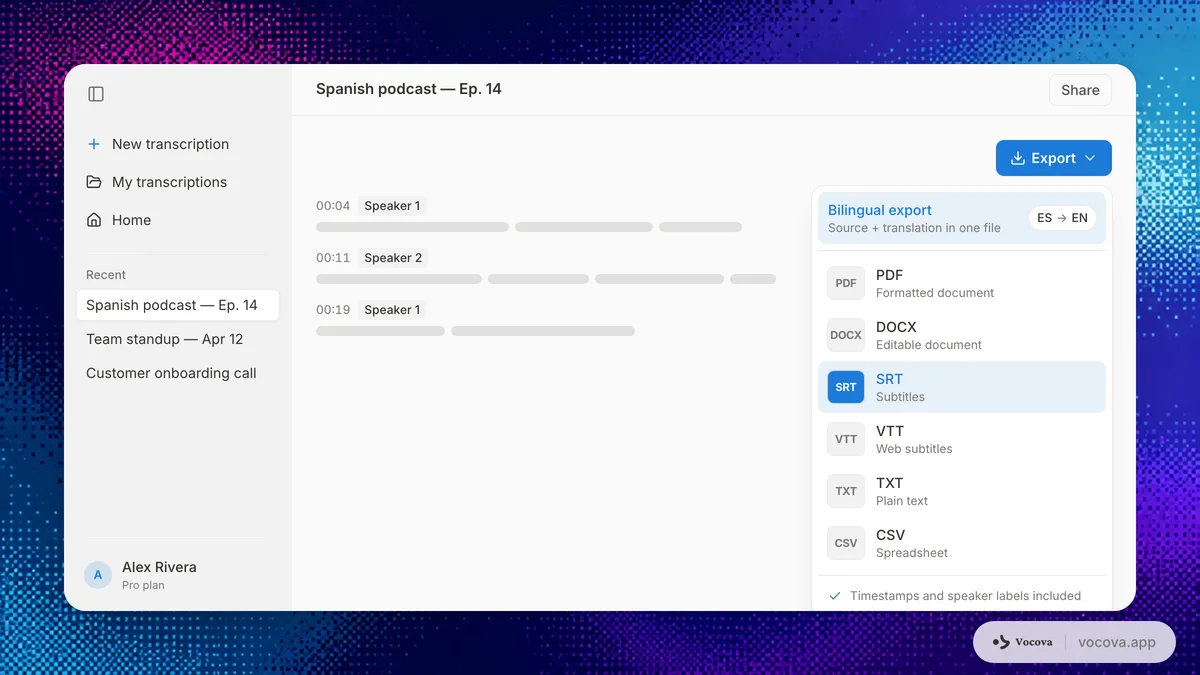
A worked example: 45-minute Spanish podcast → English bilingual SRT
To make the workflow concrete, here is what one episode actually takes end-to-end. Numbers are typical for a clean studio recording with two speakers; messy field audio runs slower.
| Stage | Action | Time | Output |
|---|---|---|---|
| 1 | Upload the 45-minute MP3 (≈ 65 MB) on Plus, or paste the public episode URL | 1 min | File queued |
| 2 | Auto-detect picks Spanish; transcription runs server-side | 4-6 min | Source transcript with timestamps |
| 3 | Skim for proper nouns: hosts, guest, brand names, episode-specific vocabulary; fix 8-15 entries | 8-12 min | Cleaned source transcript |
| 4 | Translate transcript to English (Plus / Pro) | 2-4 min | English transcript |
| 5 | Spot-check the English output, focus on names, numbers, dates, and any technical terminology | 8-12 min | Reviewed English |
| 6 | Export bilingual SRT for subtitle workflows, or bilingual DOCX for content reuse | 1 min | Final deliverable |
Total: ~25-35 minutes of human attention for a 45-minute episode (the model time is mostly background). The expensive parts are stages 3 and 5, proper-noun review on the source transcript, and a sanity pass on the translated output. Skipping them reliably produces fluent-sounding English that misidentifies guests or mistranslates product names.
A few things change with the source language:
- High-resource languages (English, Spanish, French, German, Italian, Portuguese, Japanese, Mandarin) hit the timing above.
- Mid-resource languages (Korean, Dutch, Russian, Arabic, Polish, Vietnamese, Thai) usually need 1.5-2× longer cleanup in stages 3 and 5.
- Low-resource languages (see transcription accuracy by language for the tier list) often need a second pass before the translation step is worth running at all.
Variants of this same flow:
- Multilingual interviews: swap step 6 to bilingual DOCX/PDF with timestamps. See multilingual interview workflows.
- Global podcast repurposing: translate the same source transcript into multiple target languages in parallel; keep one reviewed source as canonical. See podcast transcription workflow.
- Customer calls and sales research: keep timestamps, speaker labels, and the source transcript visible alongside the translation so quotes stay auditable.
- Translated subtitles: start at translate video; review line length before publishing.
Common language pairs and where to start
If the target is English, translate audio handles every source language below, pick the source on import and English on export. The table below lists the source-language transcription tool to use when you only need the original transcript without translation.
| Source language | Source-only transcription |
|---|---|
| Japanese | Transcribe Japanese |
| Korean | Transcribe Korean |
| Mandarin / Chinese | Transcribe Chinese |
| Spanish | Transcribe Spanish |
| French | Transcribe French |
| Portuguese | Transcribe Portuguese |
| German | Transcribe German |
| Italian | Transcribe Italian |
| Arabic | Transcribe Arabic |
| Hindi | Transcribe Hindi |
For source/target pairs not listed above, the same translate audio tool covers transcription in 100+ source languages and translation into 140+ target languages, pick the source on import and the target on export.
Quality checks for multilingual transcripts
Use a lightweight review checklist:
- Does the detected language match the actual main language?
- Are speaker labels correct enough for the use case?
- Are names and product terms spelled consistently?
- Are numbers and dates correct?
- Are mixed-language phrases preserved correctly?
- Does the translation keep the meaning, not just the words?
- Do subtitles fit on screen without overly long lines?
- Does the exported format match the next tool in the workflow?
For a more technical accuracy framework, see word error rate and transcription accuracy by language.
Common mistakes
Using English-only tools for multilingual audio
Some meeting tools are excellent for English meetings but weak for multilingual files, regional accents, or translation workflows. If your source language changes across projects, choose a tool built for multilingual transcription from the start.
Treating translation as the first step
Always create a source transcript first when accuracy matters. The source transcript gives you timestamps, speakers, and an audit trail.
Ignoring subtitle formats
If the final deliverable is captions, decide between SRT and VTT early. Text export alone is not enough for video localization.
Not checking file and export limits
Free plans are useful for testing, but multilingual workflows often need larger files, multiple exports, translation, and subtitles. Check whether those features are included before you process a long recording.
Why multilingual transcription matters
Language barriers are expensive, communication gaps cost global businesses real revenue through missed deals and rework, and companies regularly cite lack of multilingual capability as a reason for losing international business. With over 7,100 living languages in use (per Ethnologue) and remote and hybrid work now common, the average interview, meeting, or customer call is more likely to span multiple languages than it was even five years ago. AI transcription and translation compress what used to take human interpreters days into minutes, which is why the workflow above has become a standard part of how global teams operate.
The technology behind multilingual transcription
Multilingual accuracy has improved quickly because of a few technical shifts worth understanding when you set expectations for a recording.
- Unified multilingual models. The strongest engines now handle 100+ languages in a single model rather than one model per language. Whisper was trained on 680,000 hours of multilingual audio; ElevenLabs Scribe launched with support for 99 languages and reports high accuracy on top-tier languages; Meta's research extends coverage past 1,000 languages, including hundreds with little prior AI transcription support.
- Transfer learning. Languages share phonetic and structural features, so a model trained heavily on high-resource languages like English and Mandarin can apply that knowledge to related languages (Spanish to Portuguese, for example), bootstrapping accuracy without equivalent training data for each one.
- Self-supervised pre-training. Techniques like wav2vec let models learn from vast amounts of unlabeled audio first, then fine-tune on the smaller pool of labeled data, which is what makes lower-resource languages workable at all.
- Automatic language detection and code-switching. Because these models learn across languages at once, they can identify the spoken language without manual configuration and handle speakers who switch languages mid-sentence, both essential for real-world multilingual audio.
Challenges that remain
Multilingual transcription is not a solved problem. Set expectations accordingly:
- Low-resource languages. Coverage now spans 1,000+ languages in research models, but accuracy for many remains well below high-resource languages that have abundant training data.
- Dialect variation. A model trained on standard Arabic may struggle with Moroccan Darija; a Mandarin model may mishandle Cantonese. Aggregate per-language accuracy hides this long tail.
- Accented speech. Non-native speakers tend to see higher error rates, a real equity concern in global teams where many participants work in a second or third language.
- Cultural and contextual nuance in translation. Even an accurate transcript can lose idiom or domain meaning in translation. For high-stakes content (legal, medical, published research), keep a human in the loop, which is exactly why the workflow above reviews the source transcript before translating.
See transcription accuracy by language for the tier-by-tier benchmark behind these caveats.
Frequently asked questions
Can AI transcribe audio in multiple languages?
Yes. Modern AI transcription can handle many languages, and Vocova supports transcription in 100+ spoken languages with automatic detection. Accuracy still varies by language, audio quality, accent, and whether the recording contains code-switching.
Can I translate an audio recording directly into English?
You can, but the safer workflow is to transcribe the original audio first, then translate the transcript. This preserves timestamps and gives you a source text to review if the translation looks wrong.
What is the best format for bilingual transcripts?
Use PDF or DOCX when humans will read and review the transcript. Use SRT or VTT when the bilingual output is for subtitles. Use CSV when you need segment-level analysis.
How do I handle audio with two languages in one sentence?
Choose the dominant language, transcribe, then review mixed-language segments manually. Code-switching is harder than single-language audio, so keep the source transcript available next to the translation.
Can I translate subtitles after transcription?
Yes. Generate the source transcript, translate it, then export SRT or VTT. Review line length and timing before publishing.
Which languages are most accurate for transcription?
High-resource languages such as English, Spanish, French, German, Italian, Portuguese, Japanese, and Mandarin generally perform better on clean audio. Low-resource languages, heavy accents, overlapping speakers, and noisy recordings require more review. See transcription accuracy by language for benchmark context.
Will the free plan cover a real multilingual workflow?
It depends on the recording length. The free plan gives you 30 transcription minutes to get started, files up to 30 MB, and 3 stored transcriptions: enough to validate accuracy on a short clip in your target language and confirm whether the workflow fits before committing to a paid plan. A single 45-minute podcast episode or a 1-hour interview exceeds the free minutes by itself, and most multilingual workflows need paid features such as translation, bilingual export, larger files, or subtitle export. If you are evaluating, start with a 3-5 minute representative sample on Free, then move to Plus once accuracy and language coverage check out.
How does AI translation compare to human translation for transcripts?
AI translation is faster and cheaper, typically producing results in seconds rather than days. For routine use cases like meeting notes, subtitles, and internal documentation, AI translation quality is usually sufficient without manual editing. For high-stakes content such as legal documents, published research, or regulatory filings, human review of the AI-generated translation is still recommended.
Do I need separate tools for transcription and translation?
Not necessarily. Integrated platforms handle both in a single workflow, which preserves timestamps, speaker labels, and formatting across the transcription and translation steps. This avoids exporting a transcript from one tool, uploading it to a translation service, and reassembling the output by hand.
Sources and further reading
External:
Related Vocova guides:
- Best free transcription tools in 2026: what each free plan actually lets you finish.
- How to transcribe a YouTube video: five methods compared for what is, in practice, the most common source of multilingual audio.
- How to transcribe Bilibili videos: Mandarin-to-English deep-dive on the Bilibili platform.
- How to transcribe online videos and podcasts by pasting a link: the URL-import workflow across YouTube, Bilibili, SoundCloud, Dailymotion, podcasts, and cloud drives.
- Transcription accuracy by language: WER benchmarks: what to expect from each language tier.
Tools: